ADR 0014: Situational Checklists (Model, Triggers, UI)
Status: Accepted
Date: 2026-04-02
Related ADRs
| ADR | Role |
|---|---|
| 0013 | Palette and command surface — parent decision |
| 0010 | Modes |
| 0011 | Status strip vs checklist steps |
| 0002 | Single debug state layer for human and agent |
| 0008 | Stable MCP contracts and testable infrastructure |
Summary
- Situational checklists: model, triggers, UI; child of 0013.
- Discoverability via palette and task context, not a separate app.
Split with 0013
- 0013 — command surface: palette, discoverability overall, minimal toolbar.
- 0014 (this ADR) — situational checklists: scenario catalog, triggers, binding steps to
command_id, checklist card behavior.
Context
0013 introduces discoverability beyond palette search and proposes mini-checklists as situational hints (including aviation metaphor). This ADR records checklist mechanics separately; otherwise “what entry points exist” (0013) mixes with “how one scenario’s steps are structured”.
Decision
A checklist is not a palette replacement but a narrow layer of “what makes sense to do now in this situation”, even when the user does not know command names. Details — “Vision: mechanics” below.
Vision: situational checklist mechanics
Below — target implementation vision (iterations and checklist set per plan).
Roles of three mechanisms
| Mechanism | Purpose |
|---|---|
| Command palette | Find any known command by name / substring / hotkey. |
| Situational checklist | Show a short ordered scenario for current context; answers “what people usually do next”, not “what commands exist in the product”. |
| Toolbar | Rare anchor actions; do not move whole scenarios here. |
A step bound to a command invokes the same operation as the palette and (by contract) automation — via the unified registry (command_id) from 0013 / 0008.
Logical checklist model
checklist_id— stable id (telemetry, mode binding, content evolution).situation— relevance condition (see triggers below).steps[]— ordered steps: human-readable text; optionalcommand_idfrom registry; optional deep link (open panel, file, setting).- Step UI state (session or persisted in settings — per iteration): e.g.
todo/done/skipped/na. anchors— where a checklist may appear (compact card at editor edge, strip, first-run modal, etc.); one scenario need not be tied to one widget forever.
A checklist guides attention and delegates to the command layer on click; it need not “do magic” bypassing the registry.
When a checklist is relevant (triggers)
Rules are declarative in TOML — same spirit as UI mode config (0010); a parallel JSON “official” format for this is not needed (see 0010 on one textual config stack). Show conditions — structure like when with ui_mode, phase, events, etc. (exact schema at implementation), without logic in VM.
- UI mode (0010) — e.g. in Debug show “typical debug loop”.
- Scenario phase — high-level state machine (
no solution→build→debug→ …); each phase may have its checklist or step branch. - Event — first launch, first breakpoint in session, build failure, etc.
- Explicit request — “Show checklist…” from palette or context menu.
UI behavior
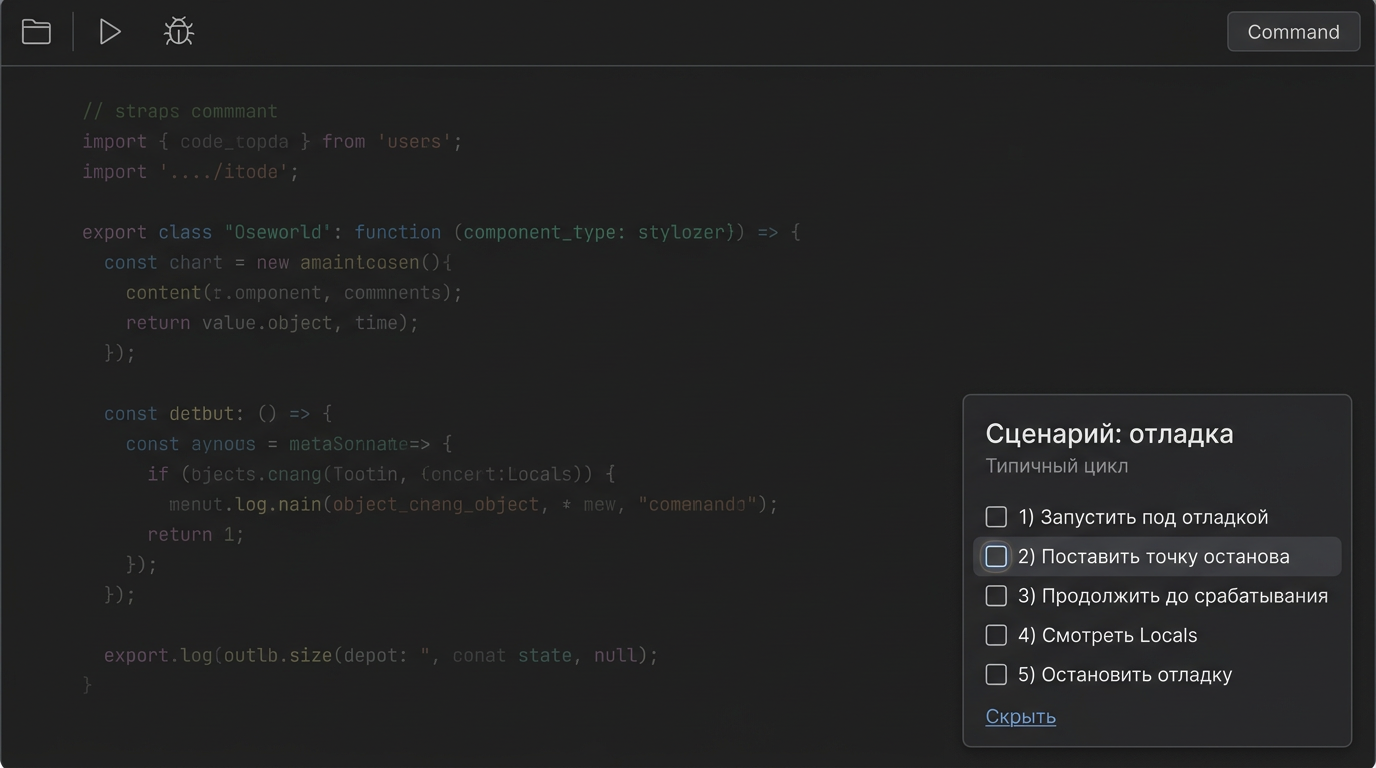
- Default — compact card (collapsible); visual reference — mockup docs/ui-ux/concept-screens/cascade-ide-checklist-ui-concept.png.
- Click on a step with
command_id= same invocation as from the palette; markdone— manually and/or heuristically after successful command (complexity per iteration). - Do not obstruct: Hide / “do not show for this scenario” without losing reopen from palette.
- Link to 0011: awareness strip is about state; checklist is about typical next steps. Do not mix long log and long checklist in one zone.
Data flow (target)
flowchart LR
  subgraph triggers [Triggers]
    Mode[UI mode]
    Phase[Scenario phase]
    Event[Event]
  end
  subgraph core [Core]
    Registry[Command registry]
    Catalog[Checklist catalog]
  end
  subgraph ui [UI]
    Palette[Palette]
    Checklist[Checklist]
  end
  triggers --> Catalog
  Catalog --> Checklist
  Registry --> Palette
  Registry --> Checklist
  Checklist -->|command_id| Registry
Out of nearest v1 scope
- Long “aviation” preflight lists with dozens of items per action.
- Embedded knowledge base inside the checklist (except links to commands and external docs).
- Mandatory sync of checklist “ticks” with the agent: parity on commands (0002); checklist state for the human may stay local until a separate decision.
Rollout order (recommendation)
- Command registry + palette (0013) — shared base for toolbar, MCP, checklist steps.
- Checklist catalog + UI card — steps with
command_id, triggers and hide rules as above.
Consequences
- Need a scenario catalog (steps,
command_id,situationrules) on top of the unified command registry; otherwise the checklist becomes a second source of truth. - Checklist UI is a presentation of invocations through the same registry as palette and MCP.
- Tests and docs (later): which checklists show by default in which modes.
Rejected alternatives (as end state)
- Checklist as a separate command channel without
command_idand registry — rejected: diverges from palette and agent. - Long checklists only, no palette — rejected: see 0013.